SerialMon — Protocol Analyzer · v4.0

Accelerate SCADA commissioning.

Test faster. Energize with confidence.

The commissioning engineer's multitool. Monitor, simulate, and debug industrial protocols — from first packet to final sign-off.

Trusted by engineers at
ABB Siemens GE
Field-Proven. Engineer-Approved.
Watch SerialMon in action
Listen in passively on the communication. You see everything in plain text, no guessing… You can also act as master or slave.
9 protocols supported
7 day free trial
3 connection modes
FAT/SAT test documentation built in
Release notes

What's New in v4.0

Secure IEC 60870-5-104

TLS and Secure Authentication as master, slave and passive monitor, with certificate tools, key management and user roles.

Anomaly Detectionbeta

Flags suspicious and non-conforming traffic as it happens, with severity levels, filters and muting.

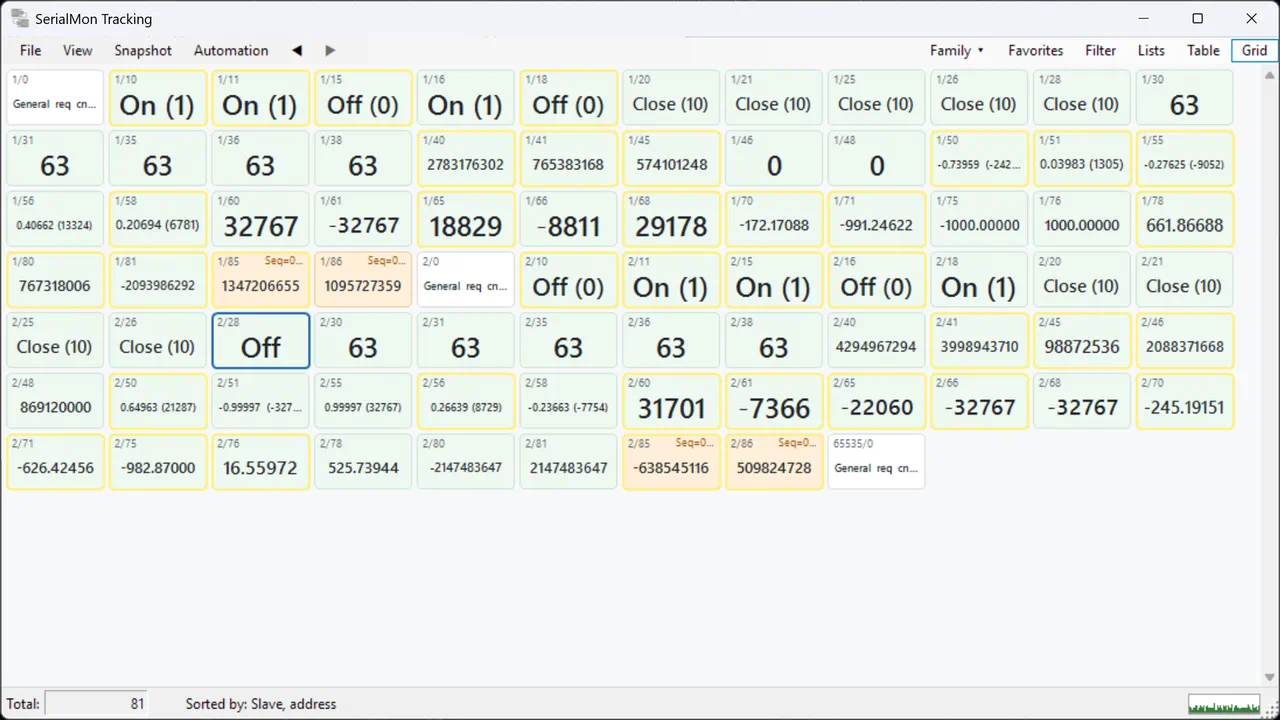
Address Tracking Grid

Every signal as a tile colored by its quality. Snapshots, favorites and change highlighting show what has changed.

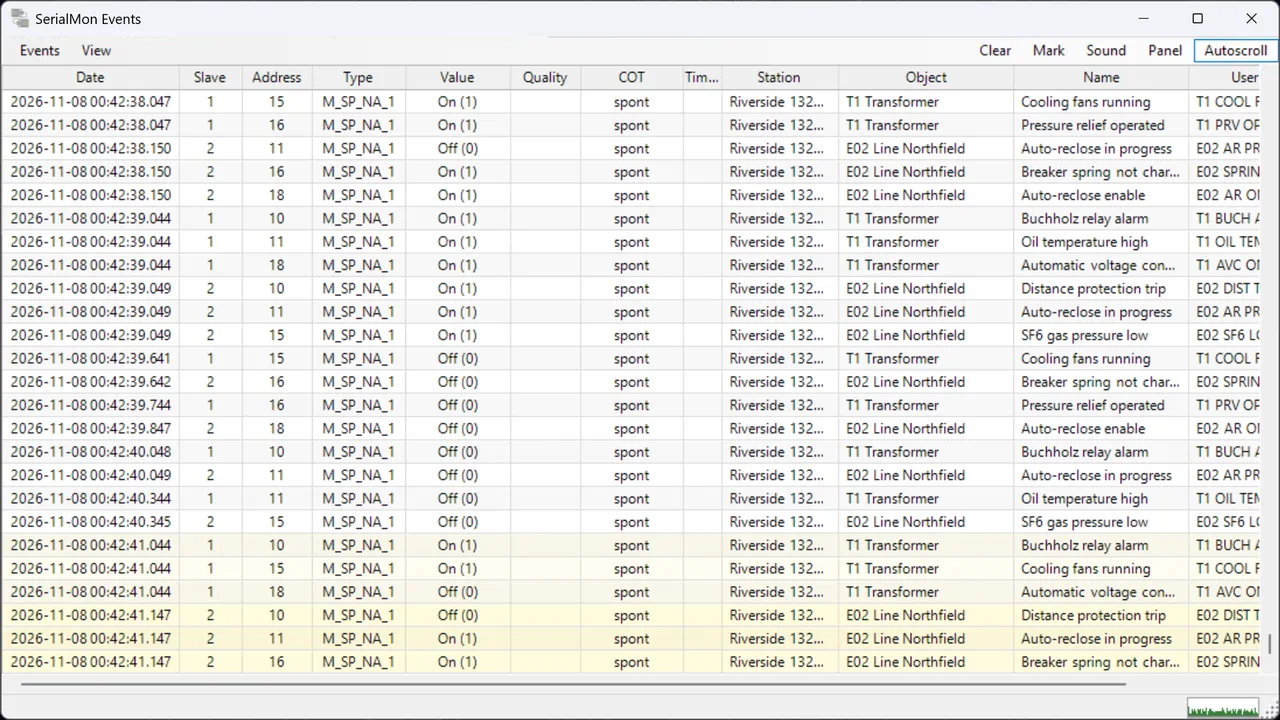
Event Panel & Timeline

New events in large text, detachable to a second screen. A timeline shows the traffic second by second.

File Transfer

Browse and download files from IEC 60870-5-101 and IEC 60870-5-104 stations, or serve files in IED mode.

Built for Long Sessions

Faster capture, grids and charts with lower memory use over days of monitoring, a choice of how much history to keep and a memory safety valve.

More Ways to Connect

UDP, IPv6 and named connection profiles, a tool that identifies the protocol on a serial line, and compressed PCAP imports.

Built in the substation. Trusted worldwide.

Why engineers choose SerialMon

Save Time

Cut commissioning time in half. See parsed protocol data instantly — no more manual telegram decoding.

  • Real-time protocol parsing
  • Instant signal tracking
  • Quick troubleshooting
Save Money

Reduce Errors

Eliminate guesswork with automatic protocol validation and clear error messages.

  • Protocol conformance checks
  • Invalid message warnings
  • Complete audit trail
Verified

Deliver Confidence

Sign off with certainty. Track every tested signal and document your FAT/SAT.

  • Mark signals as Accepted
  • Export test documentation
  • Complete signal history
FAT OK
Protocol Coverage

One tool. Every protocol.

Nine telecontrol protocols. One tool for master, slave, and monitoring roles — over serial and TCP/IP.

Features

  • Master, slave & monitor modes
  • Event list & alarm list
  • Signal tracking with full history
  • FAT/SAT export from the tracking window
  • TLS & Secure Authentication for IEC 60870-5-104
  • RS-232/422/485 & TCP/IP
  • PC clock synchronized over NTP
  • Windows 10/11

Applications

  • RTU commissioning
  • FAT/SAT verification
  • Field troubleshooting
  • OT equipment verification (RTUs, IEDs & SCADA/HMI)
Nine protocols. One licence. No add-on modules.
Built by engineers, for engineers. See how SerialMon simplifies your commissioning work.

See SerialMon in action

Shows raw and parsed data 1 2 3 4 5
Shows raw and parsed data
  1. 1Raw bytes
  2. 2Parsed telegram
  3. 3Timestamp
  4. 4Direction RX/TX
  5. 5Traffic timeline
Raw packets are shown alongside the parsed telegrams. Switch between them instantly.
Customers

Trusted by industry leaders worldwide

ABB
Siemens
GE
Svenska kraftnät
Alstom
Vattenfall Services Nordic
Omexom
K3
ONE Nordic
Get started

Ready to accelerate your commissioning?

Join thousands of engineers who trust SerialMon for their SCADA projects.

Try SerialMon

7 days full access

  • All protocols included
  • No credit card required
  • Windows 10/11

TLS, Secure Authentication and anomaly detection need a purchased license.

Download Free Trial

Get a Quote

Volume licensing available

  • All protocols included
  • 1 year of updates
  • Priority e-mail support
Request Quote
Try it on the next job. You will quickly see that you save time and money. And less stress.

Frequently Asked Questions

Common questions about SerialMon
How does license activation work?
Each KeyCode is valid for one computer. SerialMon requires occasional Internet connection for activation. You can deactivate on one computer to move the license to another. Trial licenses are available for 7 days with some limitations.
What cables do I need for serial monitoring?
SerialMon supports various connection types: direct cables, unidirectional/bidirectional line monitors, and in-the-middle connections. For RS485/RS422, you'll need appropriate adapters. We recommend quality FTDI USB-to-RS232 adapters like the FTDI US232R-100.
Do you support special serial tap devices?
Yes! SerialMon supports Stratus Engineering passive tap modules (EZ-Tap Pro for RS232, Versa-Tap for RS232/RS422/RS485). These USB devices provide hardware timestamping and auto-detection of baud rate, data bits, and parity.
How do I monitor network communication?
Use Network Monitor with an Ethernet switch that has port mirroring enabled, or an Ethernet hub. Npcap installation is required (on Windows 10, WinPcap also works).
What is SerialMon?
SerialMon is a multiprotocol sniffer/analyzer for serial & network communication. It's designed for troubleshooting gateway/RTU communication, signal testing to control centers, and verifying communication protocols in industrial automation systems.
How do I scale analog measurements?
In Address Tracker, select a signal and go to the User-defined tab. Check 'Scale' and set min/max values. For ABB RP570, configure AVM scaling range (±2000, ±2047, or -2048 to +2047) in Protocol settings.
What are the system requirements?
SerialMon requires 64-bit Windows 10 (version 1607 or later) or Windows 11, on a processor with x86-64-v2 support (SSE4.2 and POPCNT). It also runs on Windows 11 on ARM through x64 emulation, except Serial Software monitoring, which needs an x64 processor. An occasional Internet connection is needed for license activation. Network monitoring needs Npcap; on Windows 10 the setup installs WinPcap, which also works.
How do I configure triggers for time synchronization?
In Preferences → Triggers, configure serial port pins (DCD, DSR, CTS, RI, DTR, RTS) to monitor additional signals. You can track rising/falling edges and measure timing between data changes and telegram transmission.
Can I send custom telegrams?
Yes! Use the Packet Builder (Tools → Packet builder) to construct custom packets for supported protocols. You can queue multiple packets and send them in sequence, perfect for select/execute command pairs in Control Center or IED modes.
What protocols does SerialMon support?
SerialMon supports IEC 60870-5-101, IEC 60870-5-102, IEC 60870-5-103, IEC 60870-5-104, ABB RP570, ABB SPA-bus, ABB SPA/TCP, NMEA 0183, and time protocols such as RFC 868 and serial clock telegrams. All protocols are included in a single license.
What's the difference between half-duplex and full-duplex monitoring?
Half-duplex uses one serial port with a diode/resistor circuit for protocols like RP570 and SPA-bus where devices don't talk simultaneously. Full-duplex requires two serial ports to monitor both directions when devices can communicate at the same time.
How do I configure IEC 60870-5-104 timeouts?
In Protocol settings: t1 (Send test APDUs, default 15s), t2 (Ack in case of no data, default 10s), t3 (Testframes, default 20s), k (Max unack APDUs, default 12), w (APDUs until acknowledge, default 8). Connection establishment timeout is fixed at 20 seconds.